Flux

Features

Everything in Flux 1.1.38

The engine, the templates a game starts from, 26 frameworks on one core, Flux Launcher and how a release is made, grouped as Flux's own feature list groups them. All of it is in Flux today, as of 24 October 2026.

The engine

Flux 4.7.2-flux-1.1.20

Godot Engine 4.7.2 with Flux's module and patches, in a standard and a .NET edition, with the Windows export templates built beside them.

Editor and templates, built together
Flux 4.7.2-flux-1.1.20 is the editor and the Windows export templates, debug and release, always built and shipped together. A game exports with templates that have every Flux module in them, and a stock Godot template can never be picked up by mistake.
C# as well as GDScript
Every build comes in two editions side by side: the standard editor, and a .NET edition that runs C# beside GDScript, each calling the other. Every Flux addon carries a C# class for each of its classes, so saves, settings, multiplayer and Steam read as C#: a signal is an event, a wait is a Task.
C# that builds anywhere
Each build carries its own C# packages, so a build copied to another PC builds C# with nothing to fetch; it needs the .NET SDK 8 or later. A new C# game locks its NuGet packages from its first build, and the release check restores them as locked and fails a release on a High or Critical security advisory.
C# that keeps up with GDScript
The C# a game uses to reach its own GDScript is written again the moment one of those scripts is saved, so the next Play builds against what the GDScript has now. A game's GDScript can name a class from a C or C++ library, and its C# still builds.
Who owns what, in one place
A guide sets out when an object goes in GDScript, C#, C++ and C, how each language keeps one it did not make, and what is copied as it crosses between them. The Flux addons' C# holds nothing behind the game's back: an object goes the moment the game disposes it.
C too
Every build comes with flux-c, Flux's C SDK. C can make classes the game uses like any node and call every engine method, 17,000 of them, made from the build's own engine. No C++ needed, and the same headers work from C++.
Its own name and logo
The title bar, the splash, the window and exe icons and the About dialog carry Flux's logo and say Flux, based on Godot Engine. Godot's MIT licence, its copyright lines and its contributors' credits stay in every build.
Flux's own colours
The editor opens in the logo's blues, with its cyan for focus, the open tab and Run, and Flux Night for scripts. They are only where a build starts, so a developer's own theme stays theirs. A game opens on the Flux splash unless it sets its own.
Every build says what made it
Each build is labelled with its Godot version and platform version, and carries a record of the Godot commit, the platform commit, the patches and the modules behind it. It keeps its settings and export templates beside it, so it never mixes with any other Godot on the machine.
Crashes leave a trail, in every build
When a game crashes, Flux writes the kind of crash and where, the engine's backtrace and the backtrace of the game's own scripts to its log. Godot does this only in debug builds and only for the main thread; Flux does it on every thread, release builds included.
Crashes named by function
Every build keeps the debug symbols of the release template its games are made from, never inside a game, so its editor names the engine function and file behind each line of a released game's crash.
Nothing of the machine that built it
A game's exe holds no folder or user name from the PC Flux was built on, and the tests check every build for it.
Memory counted in every build
Godot counts its memory only in debug builds. A Flux game reads what it has taken from Windows in any build, which is what its memory budget is held to.
A thin fork
Upstream Godot plus twelve small patches and one module. The patches carry the branding, put ray-traced reflections, shadows and bounced light in place of Godot's own, build a moving scene's ray tracing twenty times faster, and fix what Godot 4.7 gets wrong, from a texture leaked for every reflection probe to a C# game crashing as it quits. Moving to a newer Godot is a quick job instead of a big merge.
One command builds it all
One command fetches Godot at the pinned release, applies the patches and builds both editions' editors, templates and C# packages, in about an hour and a quarter from scratch. It never deletes a build an editor or game is still running from.
Starting a game

The base template and seven more

Every game starts from a template with its own smoke test, and carries one manifest that says what it is built on.

  • Base

    Every game starts here: a main menu, a pause menu that saves and muffles the game's sound, settings with General, Audio, Display and Controls tabs, every menu text ready to translate, every setting named for screen readers, saves wired in, keyboard and gamepad controls and a smoke test.

  • 2DGDScript or C#

    A small platformer: a character that runs, jumps higher the longer the button is held and drops through planks, a tile level the TileMap panel edits, coins and a flag, and local co-op for up to four on one camera that zooms out to keep everyone in view.

  • 3DGDScript or C#

    A small lit world: a character and a third-person camera that comes in when a wall is behind, a sky and a sun with shadows, gems to find, a five-second intro, and trees that swap their detailed models for simple ones as you walk away.

  • VR

    A VR game through OpenXR: walk, turn in steps, pick crates up and throw them, and every menu on a panel in the world you point at. With no headset it plays on the desktop, so it can be worked on without one.

  • Strategy

    A grand strategy game: a continent of 1482 provinces shared between 48 nations that tax, go to war, take vassals and lose provinces to revolt, six map modes, and a world that moves on every core so the map never stutters.

  • Co-op

    Multiplayer from the start: up to 8 players through Steam or on the local network, voice chat, invites, three example achievements, and the game going on under the next player when the host leaves.

  • Server

    A game played on dedicated servers: the server runs and keeps the world with no player of its own, saves every few minutes, takes commands in its window, and is one export away.

  • Lobby

    A game played in matches, on the co-op template: a lobby to gather and ready up, a timed round in an arena, results, achievements, a leaderboard and Quick Match.

One manifest, flux.cfg
One file per game: the studio, the project ID, the engine build it is pinned to, the addons it uses with their versions, and its Steam App IDs for development, demo, playtest and release. Nothing secret ever goes in it, and every export carries it.
The editor keeps an eye on it
The top bar shows the studio, the game and the pinned build, and turns yellow with a warning when the editor or an addon does not match what the game pins.
Credits done right
Every template's credits screen lists the game's own people, then "Made with Flux, based on Godot Engine", Godot's licence and the notices of the code by others in the game, exported games included, so every game meets those licences from day one.
Playtest, demo and server builds
The co-op template has a Playtest export anyone with Steam can play on Valve's test App ID, a Demo export, and a Server export that makes the game a dedicated server with no window and no sound.
Two ways in, same result
New game in Flux Launcher and one command from a platform checkout make exactly the same game.

Frameworks

26 frameworks on one core

Each one is its own addon, so a game only carries what it turns on. They depend on nothing but the core addon, wpd_core 2.7.0, and each brings its own checks to the release check.

Saves

wpd_saves 1.2.1

Save slots that come back exactly as they went in.

Exact
Whole numbers stay whole, decimals keep every digit, and vectors and colours come back as themselves.
Versioned
When what a game saves changes, a small upgrade step brings old saves forward on load. A save from a newer version is refused with a clear message, never half-loaded.
Never lost
The save before is kept as a backup, and a save cut short by a crash or a damaged file falls back to the newest good copy. Every file is checksummed, and saves can never carry code.
Large worlds, no pause
A strategy game's whole world saves compressed on another core while the game plays on, a 4 MB world to 1.1 MB. A Saves dock in the editor shows what each slot holds.

Settings

wpd_settings 1.9.0

Each setting defined once, with its default, its limits and what it changes in the game.

Only what the player changed
The file holds only the player's changes, so a better default in a later update reaches everyone who never touched it. A hand-edited or old file never breaks the game.
Audio and display, ready-made
A volume for every bus, window mode, vsync, frame cap, render scale with FSR sharpening and anti-aliasing. A game sets its own display defaults in one line, and opens on the monitor it was last moved to.
Quality presets
Low, Medium, High and Ultra, or Custom: one choice sets the render scale, the upscaler, anti-aliasing and the quality of shadows, bounced light, reflections, fog and motion blur. A game can bring presets of its own.
The game's look stays the game's
Quality never switches on an effect the scene does not use, and Ultra gives the heavy ones back exactly as the art had them.
Only what the renderer draws
The 3D template's Graphics tab hides what Forward+, Mobile or Compatibility cannot draw. A scene with every effect on took 0.07 ms of the GPU at Low and 1.22 ms at Ultra on Flux's test machine.

Controls

wpd_input 1.4.0

Rebinding, button prompts, rumble and local co-op with a pad each.

Rebind anything
Keyboard, mouse and gamepad, with a main and an alternate binding per action. Moving onto a key another action uses swaps the two, so nothing ever does two things.
Prompts that name the right thing
The key printed on the player's own keyboard layout, and Xbox, PlayStation or Nintendo names on a pad, switching as they move between keyboard and gamepad.
Local co-op, a pad each
Up to four players at one screen, each read on their own device only. A player joins with A on a free pad, and an unplugged pad keeps its player's seat until a pad is plugged back in.
Rumble that feels right
Each hit rumbles the pad's two motors and fades away, and a burst of hits stays one firm rumble. It goes quiet while the game is paused, and the player's Vibration setting turns it down or off.

Languages

wpd_localization 1.2.1

Games in as many languages as they need, from one table a translator can open in any spreadsheet.

Switch while playing
Every text on screen changes at once, menus over a paused game included. The first time, the game picks the language closest to the player's own system.
Listed by its own name
Deutsch, not German, so a player who cannot read the current language still finds theirs. A new language is one more column in the table.
What is still missing
A Localization panel shows what each language lacks and catches the usual table mistakes. While a game is tested, it notes every text it showed with no translation yet.

Sound

wpd_audio 1.1.1

The player's volumes on top of the sound designer's mix, so turning the music down never undoes their balance.

Snapshots
Named changes to the mix, such as a pause menu that drops the music and muffles the world, or a cave with more echo, that fade in and out and stack.
Music that carries on
Crossfades from track to track and carries on across scene changes and under the pause menu.
The player's own output
Players pick the speakers or headphones the game plays through, and can mute it while they are in another window.
Sounds that tidy up
A sound played once frees itself, a sound played many times at once is held to a sensible number of copies, and loops fade on and off.

Accessibility

wpd_accessibility 1.1.1

Subtitles and captions, larger text, colour-blind filters and mono sound.

Subtitles and captions
Speech with the speaker's name and captions for sounds, at a size and background the player picks. They wait while the game is paused, translate like any text, and a screen reader reads them out.
Text from 100% to 200%
Every menu, list and HUD grows at once, and the template's menus make room for it.
Colour-blind filters
For protanopia, deuteranopia and tritanopia at a strength the player picks. A studio can give its own colours a version for each kind instead.
Mono sound and screen readers
Mono for players who hear with one ear, and every setting in the template read out with its name, such as "Language: English".

Multiplayer

wpd_multiplayer 1.21.1

Sessions over the local network and Steam, up to 32 players, and the game going on when the host goes.

Always in a session
A game played alone is a session of one, so hosting turns the running game into a session others join, with no reload.
One list of every game
Games on the local network, Steam's public lobbies and the servers on Steam's list come back as one list, joined the same way. Quick Match finds the player a game with company, or hosts one.
A join that says why
A full session, another version of the game or a player who wasn't invited is turned away with the reason, before they see the world. Old and new builds of Flux never half-join.
Things the game makes, for everyone
The host puts crates, balls and enemies in the world, and every player sees the same thing, a player who joins late included. Networked Object sets a scene up in one dialog.
Smooth on a real connection
Movement plays back a tenth of a second behind, so late or lost packets never show as stutter. Measured with 32 cars, a ram is felt on the rammer's screen on the same tick as the host's at up to 200 ms of lag.
32 players in a session
Tested with 32 at once: everyone joining in under a second, the 33rd told it's full, and voice heard by everyone. 32 cars cost a player about 14 KB/s.
The game goes on when the host goes
A game turns it on, and when the host quits or drops, the next player takes over with the world as it was on their screen, on the local network and over Steam. A player who drops keeps their place for a minute and gets back in by themselves.
Dedicated servers
A game can run as a server with no player of its own, keep running with nobody in, and take commands at its console.
Tools for finding what went wrong
In a test run the debugger sets a bad connection for each copy, lists who owns every networked thing, logs every message in plain words and flags anything that drifts apart between players.

Steam

wpd_steam 1.11.1

The right App ID for every build, lobbies and invites, servers on Steam's list and builds ready to upload.

The right App ID for every build
Development, demo, playtest and release are listed once, and every build picks its own. A Steam menu on the toolbar runs the editor as any of them.
Warnings before a mistake ships
A demo sharing the release App ID, Valve's test game as the release ID or a debug build on release is flagged. A GodotSteam that has changed leaves Steam off with one warning instead of failing mid-play.
Ready for Steam's upload tool
Every export that can go to Steam gets the script steamcmd uploads it with, aimed at the right App ID and depot. A debug build can never go up by mistake.
Lobbies, invites and friends
Friends-only or public lobbies, invites, an in-game friends list, players' Steam pictures and a list of public games. Every connection goes through Steam's relay, so players' IP addresses stay private.
Servers on Steam's list
A dedicated server goes on Steam's own list, so players find it from anywhere, and Steam checks every player before they're let in. Nothing of Wrenchy Productions' has to run for it.
Steam stays optional
A game without GodotSteam, or a player without Steam running, plays on without it.

Achievements, stats and leaderboards

wpd_achievements 1.3.1

The same calls on Steam or with no platform at all.

All in one file
achievements.cfg defines each achievement, stat and leaderboard. An Achievements panel edits them and copies them out in the order Steamworks asks for.
Tested while the game runs
The debugger's Achievements tab shows every achievement and stat as it changes, awards or resets them, and submits a test score.
Leaderboards with names and places
Best or latest score, times shown as 1:05.250, and the top, the scores around the player's, or their friends'.
Works from day one
On Valve's test App ID everything is kept on the player's machine. As the game starts on Steam, it names whatever Steam and the game disagree on.

Voice chat

wpd_voice 1.2.1

Voice for any multiplayer game on Windows, over the game's own session, with no outside service to sign up for or pay.

Clear voices
Background noise is taken out before anything is sent, and voices go as Opus, about 3 KB a second for each player talking.
Open mic or push to talk
With a mic volume and a threshold so breathing and room noise stay home, and the start and end of every word kept.
Heard from where players are
In 2D or 3D, fading with distance, or flat for a lobby. Voices play a moment behind, so a bad connection never breaks them up.
A mic test
It plays your voice back exactly as the others hear it. The microphone opens only when someone could hear it, never in a solo game.

Crash reports

wpd_diagnostics 1.3.1

A report on every run that closed unexpectedly, kept on the player's PC.

What it keeps
Whether the game crashed, the game, engine and addon versions, the PC, graphics card and screen, what the game was doing, its last errors and its log.
The player is told
The main menu says the game closed unexpectedly, that a report was kept and nothing was sent anywhere, with a button that opens the folder to send it.
No personal details
Home folders, user and computer names, e-mail and IP addresses, Steam IDs, keys and the names of everyone in the game are taken out before a report is written.
Read in the editor
Read Crash Report opens a report a player sent, and the editor of the game's build names the engine function and file behind each line.

Release checks, build stages and test builds

wpd_release 1.12.1

About 30 checks on the exact build that goes out, and stages only an approver moves a build past.

It checks the build that goes out
One button or one command makes the release build, reads back what went into it and starts it, so what passed is what gets uploaded.
It plays the build
The game's own smoke test plays the release build: the menus, a game saved and loaded, and for a multiplayer game hosting and joining. A template game's build plays its whole test in 2 to 10 seconds.
What it catches
A game still named "New Game", missing files, scripts that do not compile, the wrong engine build, a release on Valve's test App ID, missing licences, anything named like a key inside the build, and a build that plays differently from the project.
A report to approve from
The engine build, every addon's version, the game's commit and a SHA-256 fingerprint of every file in the build.
Build stages
Development, internal testing, external testing, release candidate and approved release, kept in the game's own releases.cfg in git. A build changed after its check cannot be marked until it is checked again.
Approvals that can't be faked
Only an approver sends a build out of the team, and each approval is signed with the approver's key over the exact build files. A record edited by hand shows in red.
Test builds in one click
A debug build exported, checked to start and zipped to hand out. It keeps its saves and logs apart from the tester's own copy, and every screenshot names the build in a corner.

Performance budgets

wpd_performance 1.3.0

Budgets a team sets for its game, measured while it runs and held in the release check.

Budgets
The frame rate to hold, memory and video memory, how long it may take to start and to load a level, and what it may send each player, defaulting to 60 fps, 2 GB, 1 GB, 10 seconds and 5 seconds.
Told the moment one is missed
In the game's log, and in a test run as a warning in the debugger with live graphs of every budget.
Judged fairly
A frame budget is kept when 95 frames in 100 make it, so one hitch on a busy machine doesn't count against a game, while steady stutter does.
How busy the machine is
The processor time the game takes and each of its threads' share by name, read once a second on Windows, release builds included.

Asset checks and import rules

wpd_assets 1.2.2

Every asset checked the way the build will have it.

What it finds
Failed imports, files a scene uses that are not there, textures over the game's size limit, uncompressed textures or sounds over its memory limit, and folders imported different ways.
In the editor and as it comes in
Check Assets lists every problem a double-click from its file, and an asset is checked as the editor imports it.
Each folder imports its own way
A folder's rule comes from a preset (2D art, 3D textures, normal maps, sound effects, voice lines, music), every new asset follows it, and Fix Imports puts every asset right in one click.

Visual debugging

wpd_overlays 1.2.1

See the running game another way: wireframe, overdraw, light, levels of detail and collision shapes.

Views in the running game
F4 moves through the wireframe, which way surfaces face, overdraw, the light alone, lights per mesh and each mesh's level of detail.
Lighting problems spelled out
Lights per mesh paints any mesh past Mobile and Compatibility's limit of 8 lights magenta, so a missing light in a VR or mobile game is found in seconds.
Collision shapes on and off
Shift+F4 draws every physics body's real shapes in 2D and 3D as the game runs, and hides them again.
Gone from release builds
It works in the editor's runs, test builds and debug exports. The debugger's Overlays tab switches the game to any view the engine has.

Shaders, materials, looks, lighting and motion blur

wpd_shaders 1.13.0

Tested shaders, presets, a material generator, looks, art directions and lighting setups, all starting points a game picks.

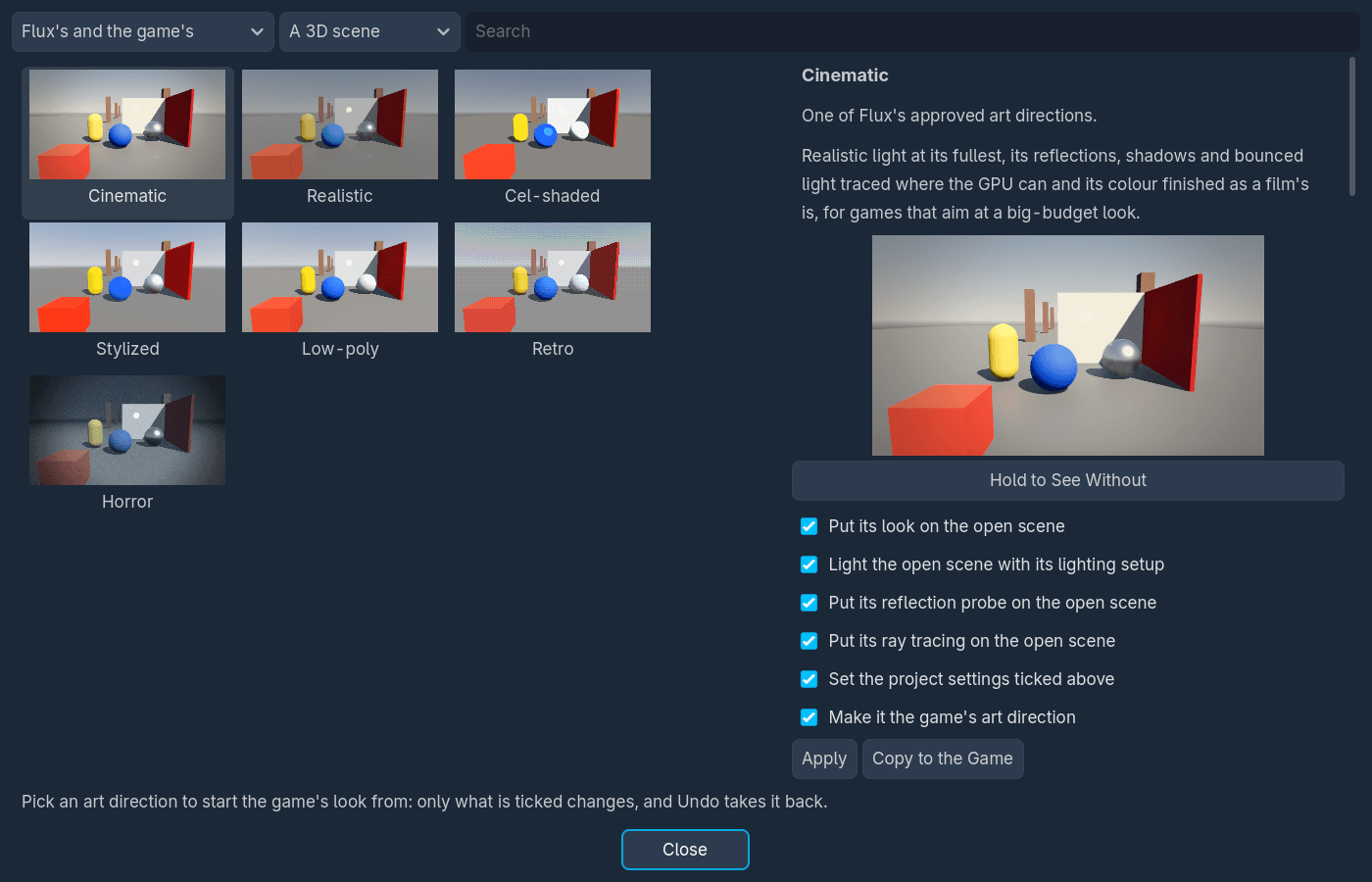
The Art Direction dialog in the Flux editor, build 4.7.2-flux-1.1.20, on a game made from the 3D template: Cinematic, Realistic, Cel-shaded, Stylized, Low-poly, Retro and Horror, each in a picture of the same scene, with Cinematic picked and its look, lighting setup, reflection probe and ray tracing ticked to put on the open scene.
20 shaders, alike on every renderer
Outlines, toon lighting, water, swaying grass, hit flashes, dissolves, ground fog, force fields, holograms and more, each drawn alike on Forward+, Mobile and Compatibility and checked on all three.
Effects in one line
A hit flash, a dissolve, a highlight or an outline goes on a character with one line and comes off leaving its materials as they were. A hundred flashing enemies cost no more than one.
51 presets and a material generator
Presets picked from pictures without writing shader code, and materials made from an art style, what the surface is and what it needs, or from a texture set found by its names.
Checked and measured
Check Shaders reads every shader the way each renderer the game runs on reads it, and Profile Shaders times every material over a 1080p screen, most expensive first.
Looks and art directions
17 post-processing looks and seven art directions, Cinematic, Realistic, Cel-shaded, Stylized, Low-poly, Retro and Horror, each shown in pictures and put on the game in one step Undo takes back.
Lit as its style is
Every art direction but Retro brings a lighting setup and the reflections that suit it. Cinematic has golden hour, and in a game with ray tracing its reflections, shadows and bounced light are all traced.
Lighting setups
Six, for a time of day and a place, each lighting the open scene and baking its light. A script blends a running game from day to night.
Motion blur
What moves across the view smeared along its motion, about 0.16 ms of the GPU at 1920x1080 on the test machine, on Forward+.
Starting points, not a look
Nothing changes how a game looks until it asks.

Cutscenes and animation checks

wpd_animation 1.1.1

Cutscenes made in Godot's own animation editor, and broken animations found before a player sees them.

Add a Cutscene node
Its camera takes the view and glides back to the player's, black bars come in, its lines show in the subtitles, and the controls and HUD go off while it plays.
Hold to skip
A skipped cutscene ends exactly where it would have, and the ones a player has seen go in their save.
Animation checks
Check Animations follows every track of every animation to what it moves, so a renamed node or a changed bone is caught. The release check holds every build to it.

Screens and UI checks

wpd_ui 1.2.0

Menus a gamepad player is never lost in, and every screen checked the way a player without a mouse meets it.

Screens that keep the focus
A screen opens on its first button and gives the focus back when it closes, and B closes only the screen on top. Every template's menus press with A and go back with B.
Walked like a gamepad
Check UI opens every screen with the game running and walks it as the arrow keys and a stick do, naming anything a gamepad can never reach.
Bigger text, checked
Every screen laid out again with its text twice as large, naming anything that runs off the screen or is cut short.

Levels of detail and occlusion

wpd_lod 1.1.1

One node over an object, its distances worked out from its size.

Drop one node over an object
A house swaps for a simple stand-in at about 100 m, and small clutter like a crate drops out at about 80 m, on Godot's own visibility ranges and mesh LOD.
No popping, no ghosting
Every switch is a clean cut that waits a few metres before it undoes, so standing on the line never flickers.
Fewer draw calls, and occlusion
A house of twenty pieces draws in a few calls. Set Up Occlusion bakes an occluder from the open scene in one click.
Measured
A town of 400 houses: 6002 objects and 1.5 million triangles plain, 528 objects and 45 thousand triangles with LOD, the CPU time of a frame down from 4.4 ms to 0.8 ms on Forward+.

Large worlds

wpd_streaming 1.1.1

A world of any size that holds only what is close.

Cut into cells in one go
Cut Scene into Cells says first what stays loaded and every link the cut would break, and leaves the scene as it was.
Only what's near is loaded
Cells round the player load on other threads, ahead of where they're heading, with stand-ins out to 2 km so the horizon is never empty.
Exact a long way out
The world moves its origin to the player, so positions stay exact to a fraction of a millimetre. A pickup taken stays gone when its cell loads again.
Measured
144 cells flown over at 80 m/s, every cell near the camera in on every frame, the longest frame 8 ms on Forward+ and under 5 ms on Mobile and Compatibility.

Province maps

wpd_provinces 1.1.1

A grand strategy map from one painted picture.

Read on every core
A 4096x2048 map of 3000 provinces reads in about a third of a second, and up to 65,536 provinces fit.
Map modes in half a millisecond
Switching from political to terrain repaints every province at once, the same at 300 provinces as at 30,000, on every renderer.
Borders and a camera
A strong border wherever two owners meet, the province under the mouse lit, and a strategy camera that never scrolls off the world.

Simulations off the main thread

wpd_simulation 1.1.1

A world that works out its ticks on other cores and never stops the frame.

No frame lost
A month that takes half a second costs no frame: on Flux's tests the frames go on at the screen's pace while it runs.
Every core, the same result
One call splits a table of a hundred thousand rows among every core, and the world comes out exactly the same on a 4-core laptop and a 32-core desktop.

Painting on a model

wpd_paint 1.1.1

A paint shop on any model: a car, a helmet, a board.

A brush in centimetres
A 12 cm brush is 12 cm wherever it lands, across the texture's seams and round corners, never through a thin panel.
Small to save and send
Nine bytes a point, so a whole livery is a few kilobytes, and a 5000-point job draws in one frame.
On every renderer
Each stroke is drawn on the graphics card the frame it's painted, on Forward+, Mobile and Compatibility.

A level editor for players

wpd_level_editor 1.1.1

A map editor inside the game itself.

The game's own pieces
Placed with the mouse, dragged, turned and raised with snapping, and roads laid as straights and bends that climb and bank.
Every change undone
Ctrl+Z and Ctrl+Y for every placement, drag, setting and road piece, and Test drive to play the level and come back.
Safe to share
A level is a small file of plain values, never code, so a map from anywhere can't run code in the game.

Ray tracing

wpd_ray_tracing 1.3.1

Reflections, shadows and bounced light traced on the graphics card's ray tracing hardware.

Reflections of the whole world
Every smooth surface mirrors what the camera can't see: the cars behind yours in its paint, the sky behind the camera in a wet road. The whole 1080p view as a mirror costs a quarter of a millisecond more than screen-space reflections.
Shadows traced too
No blocky edges and no shadows that stop a few hundred metres out, sharp where a thing meets the ground and softer as it reaches away. The sun and two lamps cost under a millisecond more than shadow maps.
Light that bounces off moving things
A car lights the road under it in its paint's colour and picks up the colour of the walls it passes, about one and a half milliseconds for the whole 1080p view.
Where it runs
On NVIDIA RTX, AMD RX 6000 and newer and Intel Arc. On a card without ray tracing, on Mobile and Compatibility and in VR, it does nothing and the game draws as before.

C++ and C in the editor

wpd_native 1.8.1

C++ and C beside GDScript and C#, built, run and swapped in without leaving Flux.

C++ without leaving Flux
New C++ Project adds a program, a library or a GDExtension library, and the C++ panel builds it, runs it and lists its errors. Its files open in a C++ screen beside 2D, 3D and Script.
clangd as you type
Errors as you type, completion, go to definition, references, rename, fixes and refactors, and Shift+Alt+F to format in Godot's own style.
A game's own code in C++, or C
A GDExtension library is a class the game uses like any node. Build it again and the editor swaps the new code in, the open scenes keeping their settings. The same in C on flux-c, with no Python and no godot-cpp to install.
Standards and libraries
C++20 or C++23, C17 or C23, picked in flux.cfg, and libraries from vcpkg named there, the whole team on the same versions.
Built inside every release
The release check builds the game's C++ for release before it exports, so what goes out is the code as it is now.
Fast, with nothing to download
godot-cpp comes with every build, and Flux finds Visual Studio, clang-cl, CMake and Ninja itself. A small project configures in about 1.5 s and builds in half a second.

Core

wpd_core 2.7.0

What every other framework stands on.

The manifest
Reads and checks flux.cfg, names the build the editor is running, powers the editor's warnings, and puts the manifest into every export.
The C#
Writes the C# every addon carries from its GDScript, and the C# for a game's own GDScript whenever one of its scripts is saved.

Flux Launcher 1.19.1

Every game, on the build it is pinned to

The launcher keeps a studio's games, the builds they use and every update in one window, and shows what an update changes before anything moves.

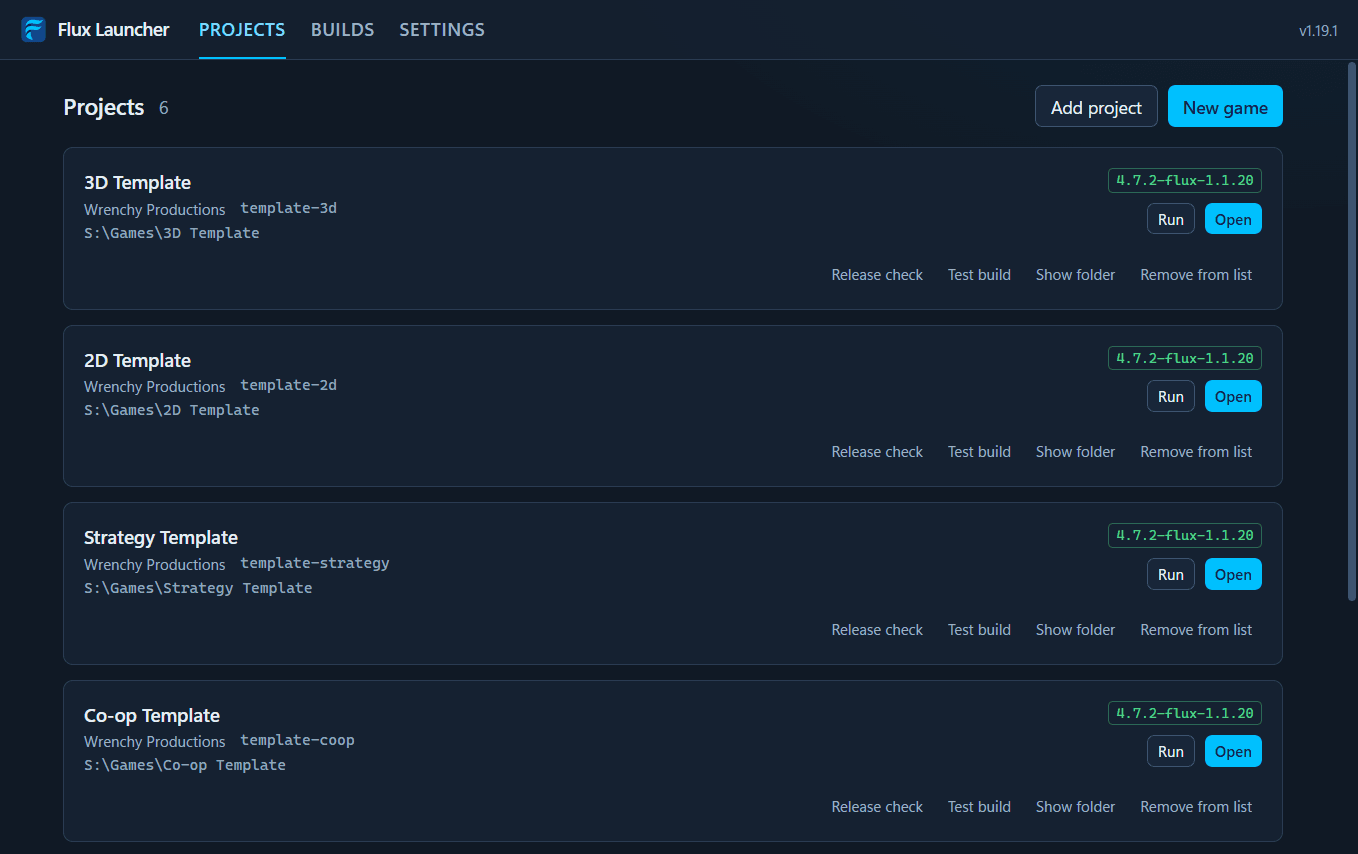
Flux Launcher 1.19.1 on its Projects page: template games by Wrenchy Productions, each pinned to 4.7.2-flux-1.1.20, with Run, Open, Release check and Test build beside each.
Your games in one list
Each with its studio, its ID, the build it is pinned to and any warnings.
Open and Run on the right build
Open starts the editor the game is pinned to, Run starts the game in a window. Nobody has to remember which editor goes with which game.
Builds from the publisher's feed
Every byte checked before it is unpacked, an online feed refused without the publisher's signature, and stable, beta and experimental channels. It works offline with whatever is installed.
New game
Straight from a release's templates, each described as you pick it, in C# for the 2D and 3D templates when the build has its .NET edition.
An art direction from the start
New game can start a game on any of the release's art directions: its look, lighting, reflections and ray tracing go on the game's world, C# games included. If that can't be done, the game is still made and the launcher says why.
Updates you can see first
The new build, each addon replaced with its changelog and the release notes, all shown before anything changes, with a backup taken first.
Tested on the game itself
The game's own tests run on the build it is on, then again once it has moved, and the row names each check the move broke.
Seen on screen, before and after
The game's reference scenes are drawn on the old build and the new, and any scene that now draws differently is shown with the changed pixels marked.
Roll back
Moves a game to an earlier release on its channel, build and addons together as that release was tested, showing first what goes back.
Known issues and withdrawn releases
A game whose build has a known bug shows how many, each with its workaround. A withdrawn release is never installed or offered again, and a game still on it says so.
Release checks and test builds
Run a game's release check, mark its builds and make a test build from the launcher, through the game's own frameworks on its own build.
Editor logs kept
The last editor session on each game is saved, crash or not, ready to send with a bug report.
A Windows installer
For one account, with no administrator needed, and the licences of everything the launcher is built with in its install folder.

Releases and quality

How Flux itself is released and tested

Flux's own releases are published, approved and withdrawn with one command each, and none is published from frameworks that have not passed the whole run of tests.

Publishing in one command
The engine build and a kit of the addons, templates and guides go to the feed, with release notes from the commits. A release starts on beta, and promoting it to stable is what approves it.
Withdrawing in one command
Every launcher stops installing it, updating games to it and making games from it, and shows the reason on each game still on it.
Everything Flux wrote, marked
Every file Flux adds opens and closes with a banner naming Wrenchy Productions and its ABN, and every line it changes in Godot's own files sits between banners, so a studio that leaves Flux can find all of it with one search.
Regression testing
Every run is kept check by check and names any check that passed last time and fails now. A release can only be published from frameworks and templates that passed the whole run.
Rendering regression tests
Every run draws 191 reference scenes on each of three renderers and holds each picture to the one before, catching a change as faint as 10% more glow.
A known issue database
Every bug known in Flux and in Godot under it, with what it does, the workaround and exactly which versions have it, reaching every launcher with the feed. It has 17 now.
Tested on every change
1879 automated checks on the frameworks, a smoke test of a new game from every template, every export put through the release check, and the launcher driven through its own buttons.
Older games checked against new frameworks
A game is made from each multiplayer template the way earlier releases made it, moved onto the changed frameworks, and played against the old build.
Guides for studios
On every framework, from the manifest and saves to the level editor, the known issues and the launcher.